

Create for free:your Human Design
Enter your date, time and place of birth to create your bodygraph (chart). No sign-up needed.
From creating your chart to using it day to day.
- Enter your birth data
- Check the chart and the 3 basics
- Save the chart image to look back on
入力情報はチャート計算のみに使用します。
HDSL chart usage record
- Total chart requests
- 7,493
- Since recording began
- 5 mo 19 d
Recorded since 2026-05-25 Updated 2026-11-13
See the distribution of Types and more
Updated 2026-11-13
Type
Profile
Inner Authority
Definition
This is a breakdown of charts within HDSL, not of the world population or of users. Saved and newly created charts are counted differently and over different periods. Public totals use only counts per category, never names or birth data.
Human Design is a self-understanding tool: you use a diagram made from your birth data (the bodygraph) as a clue for observing how you make choices and react in everyday life. At HDSL, we show you how to compare the descriptions of your Type and Inner Authority with your own daily experience.
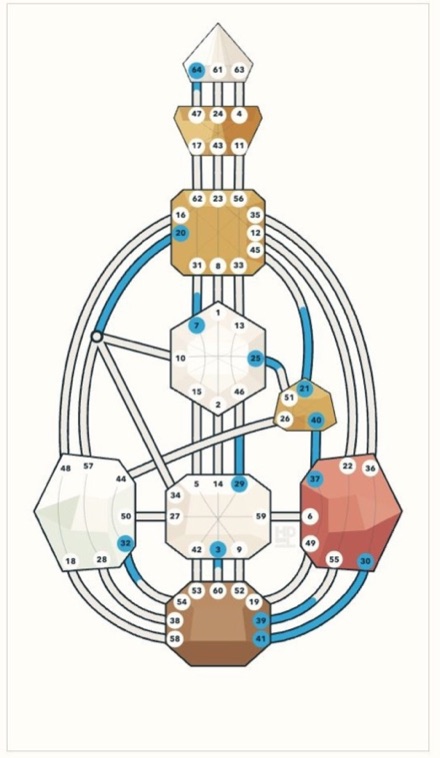
What your chart shows
- Type, Strategy and Inner Authority
- Profile and Incarnation Cross
- Activations across the 9 centers, 36 channels and 64 gates
- Horoscope wheel with the positions of 13 planets and points
- How the current sky overlaps with your chart (transit)
- Compare how your chart changes with birth time (time slider)
If you don't know your birth time, you can create a reference version calculated for 12:00 noon. The birth data you enter is used only to calculate your chart.
Using it as a self-understanding tool
Once you've made your chart, you don't need to memorize every term. Start by picking one situation and comparing it with your own experience.
Look at your Type, Strategy and Inner Authority
Start with these three. Read the descriptions in your chart and pick one point about how you make decisions that catches your attention.
Note down specific everyday situations
For example, note how you reacted when you got an invitation or made plans. Write down what you felt, how you chose, and how you felt afterwards.
Compare the descriptions with your experience
Look back at both what felt right and what didn't fit. Don't label yourself or others from a single result; use it to keep observing.
HDSL does not treat Human Design as a scientific personality test or a medical diagnosis. It does not predict your future, your ideal job or whether a relationship is good or bad. Please use it as an aid for finding questions to ask yourself.
Frequently asked questions
Is it free? Do I need to sign up?
Creating a chart is free and no sign-up is needed. Saving charts to an account is not yet available in English. You can keep your chart by saving the chart image.
Can I create a chart without knowing my birth time?
Yes. If your birth time is unknown, you get a reference version calculated for 12:00 noon. Some results can change depending on the time, so if you later confirm your time (for example, on your birth certificate), you can create it again.
Which countries of birth are supported?
We support people born in Japan, Taiwan, the United States, Mexico, Malaysia, the Philippines and China. Accurate time zone calculation is needed, so if you were born in another country, please contact us. We will create your chart individually.
Can I make charts for family or friends?
Yes. But birth data is important personal information. Please ask the person first, and don't use the results to label them.
Is this different from fortune-telling or a personality test?
It doesn't sort you by your answers to questions; it uses a diagram calculated from your birth data. Rather than giving fixed answers, it offers a framework for observing how you react and choose.
What if I don't understand my chart?
Not understanding at first is natural. Start with the three basics on the result page — Type, Authority and Profile — and the short overall reading below them.
How is the birth data I enter handled?
The information you enter is used only to calculate your chart. For details, please see our privacy policy (in Japanese).
Can I save my chart in the English version?
Not yet. Saving charts to an account is currently available only in Japanese and Chinese. In English, you can save the chart image from the image button on the result page.
Where should I start when using it as a self-understanding tool?
First, create your free chart and read the descriptions of your Type, Strategy and Inner Authority. Pick one of them, note down your everyday choices and reactions, and compare them with your own experience.
If I was born in Taiwan, how do I enter my place of birth?
Choose Taiwan as your country of birth, then choose the county or city, and then the township or district. For example, if you were born in New Taipei City, choose New Taipei City and then the district, such as Zhonghe District. You don't need the village or street address.